Osmo Pocket 3 independent product overview: setup, operation and buyer checks
A compact mechanically stabilized camera with a one-inch sensor and creator-oriented video modes. This independent quick-start explainer helps buyers understand the product before reading the manufacturer documentation supplied with the exact regional unit.
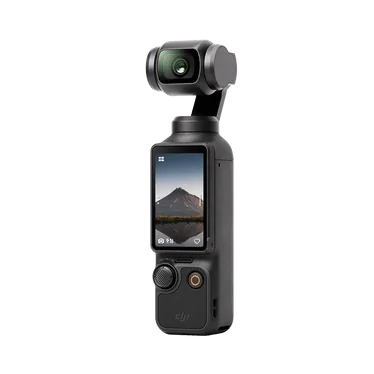
What the Osmo Pocket 3 is designed to do
Osmo Pocket 3 is listed in our catalog as a gimbal camera. A compact mechanically stabilized camera with a one-inch sensor and creator-oriented video modes.
The catalog highlights 1-inch CMOS sensor, 3-axis mechanical stabilization, 4K / 120 fps slow motion. These points help position the model, but the ordered SKU and regional configuration remain the commercial reference.
Before first use: a controlled setup checklist
Inspect the retail box and unit before activation. Record the model, serial reference, color or storage option and every included accessory so the sample can be compared with the purchase order.
- Confirm whether the unit is camera-only or a Creator Combo.
- Charge the camera and any wireless microphone components.
- Activate, update and calibrate using the supported official workflow.
A repeatable operating workflow
Use a simple test sequence that a sales or support team can repeat. Start with default settings, verify the main workflow, then change one setting at a time and document the result.
- Rotate the screen and verify horizontal and vertical capture.
- Test subject tracking in a controlled walking sequence.
- Compare internal audio with the included or optional microphone.
Care, storage and handover
Good handover content reduces avoidable returns. Keep the quick-start card, regional warranty explanation and compatible-accessory list with the product record.
- Fit the protective cover before placing the camera in a bag.
- Keep the gimbal free of sand, dust and cable obstruction.
- Record the included handle and microphone components at handover.
Common buyer questions
Frequently asked questions.
Is this the official Osmo Pocket 3 manual?+
No. It is an original educational overview. The official instructions supplied by the manufacturer with the exact unit remain authoritative for operation and safety.
Why should the regional SKU be recorded?+
Box contents, languages, plugs, wireless functions, warranty handling and accessories can differ by region or bundle.
What should a distributor verify with a sample?+
Verify the exact model, the three catalog capabilities—1-inch CMOS sensor, 3-axis mechanical stabilization, 4K / 120 fps slow motion—the included components, update workflow and intended after-sale route.
Turn product knowledge into a precise buying request.
Tell us the destination, products, quantity, configuration and delivery requirements.